WITH AN ESTIMATE approved and an order submitted, the CAD area is the first stop in the production cycle for many signs. This is the area within a signshop where sheet stock is cut on a 2D axis to produce the parts for the sign’s construction down the line. The way this process is conducted can vary based on the shop. Some facilities have router tables — we do. Others may use a CO2 laser, waterjet or plasma table to cut their material. Some shops still use printed patterns and handheld tools. Regardless of the method, the considerations discussed in this column apply to most CAD departments to ensure workflow is optimal.
Material Organization/Storage
When dealing with raw material storage, flat stock is often the most common, space-consuming material your shop keeps on hand. Sheets of aluminum, Dibond, sintra, polycarbonate and acrylic tend to take up a lot of floor space, especially when you stock various thicknesses. The first concern with your CAD area layout should be how sheet stock is stored and organized. Palletized sheets must be clearly marked and easily accessible to CAD operators. I have found that making my own labels using Dibond and vinyl with magnets affixed to the backs allows for flexible labeling in case we want to reorganize.
No need to invest in fancy rack systems: I have found that old-school pallet racking works well for our shop if the racks are placed and secured properly. Some considerations to keep in mind when designing pallet-racking layouts:
- Maximize use of vertical space: Calculate rack heights to use maximum ceiling space while maintaining required clearances. Most facilities need 18-36 in. above the top load level for sprinkler effectiveness, but local codes may require more.
- Aisle width: Counterbalance forklifts typically require 12-13 ft. for safe operation with standard pallets. Reach trucks can operate in 8-10-ft. aisles, while very narrow aisle equipment needs only 6-7 ft. but requires specialized guidance systems. These measurements must be increased to accommodate sheet-pallet sizing. Standard pallets are 48 x 40 in. where sheet pallets are normally 48 x 96 in. Your available space will also dictate if you can store sheet pallets long ways or sideways.
- Organize based on frequency of use: Ensure the materials you use most frequently are close to the CAD area and easiest to access. This may change as your customer base develops, and material may change locations as some become more needed than others.
- Keep non-standard pallet sizes in mind: For most sheet stock the common pallet size is 4×8, but you might need larger sheets for certain jobs. This may require a specialized storage area separate from your common area.
CAD Cutting Area
We can consider strategies for layout of the CAD cutting area that promote efficiency and safety. Whether you have one or multiple cutting tables, the basic principles remain the same:
- Designate staging areas for up-next material as well as finished/labeled parts.
- I prefer to assign specific duties to the sides of the tables — such as unloading and loading — which promotes consistency and safety. In the case of multiple tables, you can designate your sides for a specific purpose and your ends for another.
- If you operate multiple tables and consistently cut large sheet stock, consider an L-shaped layout for two of your machines to give your forklift more room to maneuver.
- Set up your tables so a forklift can access at least three sides of the machine, leaving one side for the operating console and wiring.
- Ergonomics are also a big factor to consider. You do not want your workers to have to strain or bend in awkward ways to load material. Allowing adequate clearances for your forklift can help with this, and two or four post-gantry cranes set up for sheet lifting can be a great addition as well.

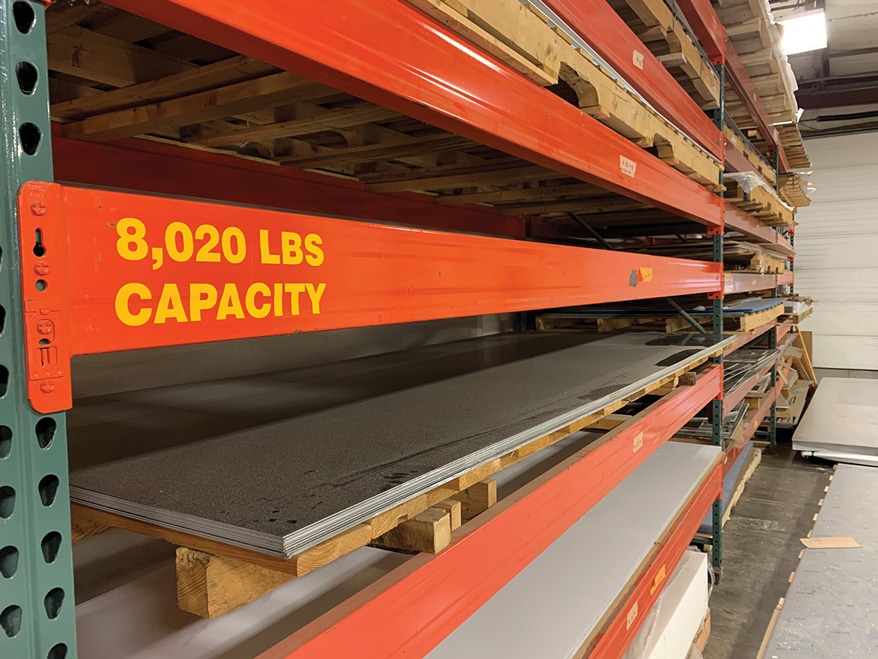 Well-placed and secured palletized racking for flat-stock storage.











 Russell Toynes1 week ago
 News2 weeks ago
 Maggie Harlow5 days ago
 Business Management2 weeks ago
 Electric Signs1 week ago
 Mark Kissling1 week ago
 Dale Salamacha1 week ago
 Signs of the Times2 weeks ago